Programming language reference
Language used in the code for custom commands is Python 3.13. Below we describe in details additional variables, functions, and objects available to developer of the custom commands that aid access to the I2C devices and their registers.
Variables
__project_name__
Variable that holds name of the current project.
__command_name__
Variable that holds name of the command that is executing.
__device_address__
Integer variable that holds i2c device address as selected in the GUI.
Objects
ctx
Context object that persists across the project session. Project session refers to a time duration when a given project
is active. That is for example from the moment application starts and previously loaded project is loaded again until
either application closes or user opens another project. Context object can be used to store arbitrary variables and
functions which become available to all defined custom commands. Assigning arbitrary variable in the context ctx
creates it and attempts to access variable before it is being assigned return None.
ctx.OSR = [1, 2, 4, 8, 16, 32, 64]
dut
Device Under Test (aka DUT) object that use to access register and theirs field as defined in the RegList. For example
dut.OSR_CONFIG  # the whole register
dut.OSR_CONFIG.osr_p  # field osr_p in the OSR_CONFIG register
Normal register fields are always interpreted as number according the fixed point number definition in the register
model in RegList. To access raw BitArray for a given field append _raw prefix.
dut.OSR_CONFIG.osr_p_raw # returns raw BitArray object for a field osr_p
Functions & Classes
read (...)
This function takes register as an argument, reads register value from the connected device and updates register with
read value. The reason we want to do that is because any register in the dut object are in memory objects that hold
last read or a default value. Calling this function allows us to update register object in memory with register value as
it is present in the I2C device. This function returns None.
read(dut.OSR_CONFIG)
write (...)
This function take register as an argument and writes its in-memory content into the corresponding register on connected I2C device. This function returns None.
write(dut.OSR_CONFIG)
Variable
Class Variable is a wrapper over any regular python variable that adds various metadata that is used to build GUI
dialog when method prompt_user(...) is called. Its first argument is value that is to be wrapped inside of this class.
Other two arguments are optional
valid_values- array of possible values which can be assigned to the value contained inside. If not given, then any value can later be assigned to variable inside.name- user-friendly name associated with this variable.
Variable(1, valid_values=[1, 2, 4, 8, 16], name="Sampling rate")
prompt_user (...)
Given its arguments, which are one or more instances of Variable (see above) constructs and presents GUI input dialog
to the user. If user clicks Ok button in the dialog, then it returns n-tuple of values selected by the user in the
order in which Variable objects were passed to this function.
a, b, c, d = prompt_user(
    Variable(1.0, name="Offset"),
    Variable(1, valid_values=[1, 2, 4, 8], name="Scale factor"),
    Variable(True, name="Enable scaling"),
    Variable(False, valid_values=[True, False], name="Enable measurments")
)
Example above build GUI dialog that looks like so
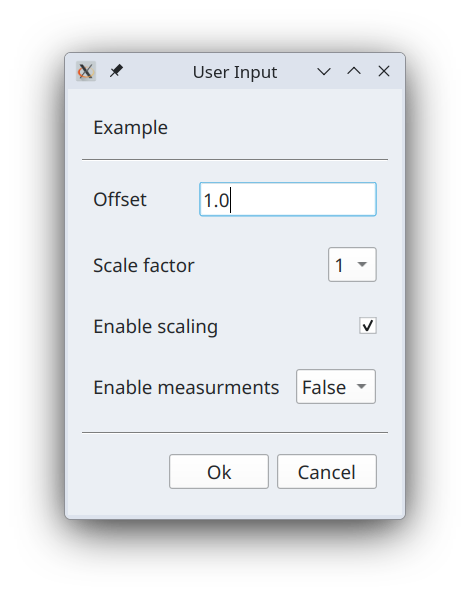
These GUI controls are formed according to the following logic.
if wrapped variable is boolean
    if valid_array is given
       show drop down box with `True` and `False` choices
    else
        show checkbox

else if valid_values is given
    show drop down box with choices from value_values agument

else if wrapped variable is integer
    show text input field and validate and constrain its content to be integer

else if wrapped variable is float
    show text input field and validate and constrain its content to be float

else
    show text input field with no validation and no contrains on its content
U (n, [BitArray | int])
This function interprets list of either BitArray objects or integers as one large BitArray into floating point number
according fixed point interpretation U{w}.{n} where {w} width of sum of all BitArray objects and {n} is $1/2^n$
scaling factor.
temp_C = S(16, [
    dut.TEMP_DATA_MSB.temp_23_16_raw,
    dut.TEMP_DATA_LSB.temp_15_8_raw,
    dut.TEMP_DATA_XLSB.temp_7_0_raw
])
If passed object is BitArray then it is concatenated into resulting BitArray as is. If object is an integer then it is
converted into BitArray first by assuming that the int unsigned representation of one byte. This means that if field
that is part of some larger number is one byte wide and is marked in register definition as U8.0 then you do not have
access raw bitarray data by adding _raw suffix and simply refer to the field by its name. In the example above all
fields are U8.0, which means that above code can be written shorter as
temp_C = S(16, [
    dut.TEMP_DATA_MSB.temp_23_16,
    dut.TEMP_DATA_LSB.temp_15_8,
    dut.TEMP_DATA_XLSB.temp_7_0
])
S (n, [BitArray | int])
Same as function U(...) but it interprets combined BitArray as signed number.